
Domain Status Overview: Understanding Your Domain Lifecycle

Managing your domain goes beyond registering a name, it involves monitoring its status throughout its lifecycle. Each status affects how your domain works, whether your website is accessible, and what actions you can take.
At Zuumhost, your client dashboard makes it easy to track your domains using clear status categories like Active, Expired, Grace, Redemption, and Transferred Away. In this guide, we explain what each one means and what you should do.
Why Monitoring Domain Status Is Crucial
Your domain is your online identity. If its status changes unexpectedly, your website, emails, and business operations can be affected.
Keeping track of domain status helps you:
- Avoid sudden website downtime
- Prevent losing your domain name
- Maintain email functionality
- Protect your brand and SEO rankings
- Stay in control of renewals and transfers
Understanding these statuses ensures you always know what’s happening with your domain.
Overview of Domain Status in Your Zuumhost Dashboard

Inside your client area, your domains are grouped into five key status categories. Let’s break them down.
1. Active Domains
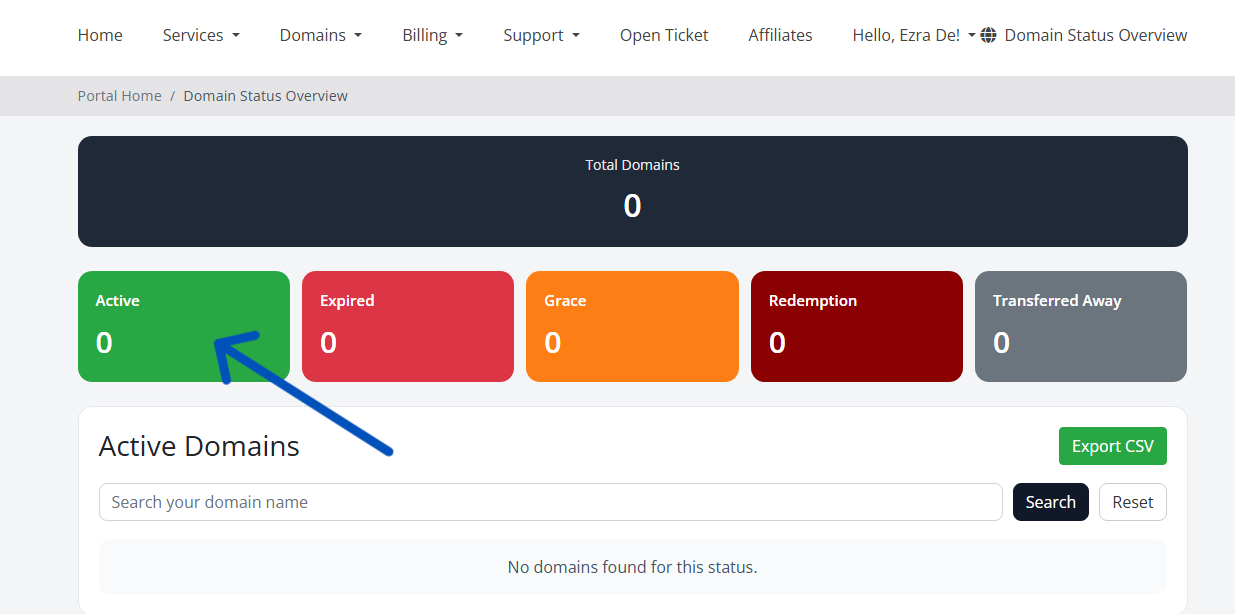
This is the healthy and working state of your domain.
When a domain is Active:
- Your website is online
- Emails linked to the domain are working
- DNS settings are functioning correctly
What you should do
Nothing! Your domain is operating perfectly. Just ensure auto-renew is enabled so it stays active.
2. Expired Domains

A domain becomes Expired when the renewal date passes without payment.
What happens when a domain expires:
- Website may stop loading
- Email services may stop working
- Visitors may see parking or error pages
What you should do
Renew the domain immediately to avoid entering the next stages.
3. Grace Period

After expiration, your domain enters a Grace Period.
This is a short window where:
- You can still renew the domain normally
- No extra recovery fees apply
- Your domain is protected from public registration
Think of this as a second chance to renew your domain.
What you should do
Renew your domain as soon as possible before it moves to Redemption.
4. Redemption Period

If the domain is not renewed during the grace period, it enters Redemption.
At this stage:
- The domain is removed from active use
- Recovery becomes more expensive
- A redemption fee is required
This is the last opportunity to recover your domain before it is lost permanently.
What you should do
Contact support immediately to restore your domain.
5. Transferred Away

This status means the domain has been moved to another registrar.
Common reasons include:
- You requested a transfer to another provider
- The domain was moved to a different hosting platform
Once transferred, the domain is no longer managed inside your Zuumhost account.
What you should do
Manage the domain from your new registrar.
How to Keep Your Domain Safe and Active
Here are simple best practices to avoid domain issues:
Enable Auto-Renewal
Automatic renewal ensures your domain never expires unexpectedly.
Keep Contact Details Updated
Renewal reminders and verification emails are sent to your registered email address.
Monitor Your Client Dashboard
Your Zuumhost dashboard gives a quick overview of all domain statuses in one place.
Renew Early
Renewing early prevents entering grace or redemption stages.
Final Thoughts
Your domain is one of the most valuable digital assets you own. Understanding domain statuses helps you stay ahead of problems and ensures your website stays online without interruption.
Zuumhost provides easy-to-use tools to track and manage your domains so you can focus on growing your business with confidence.
That’s it!
Get Started with Cpanel Hosting: Order Now
Get Started with Cpanel Offshore: Order Now
Get Started with Reseller Hosting: Order Now